Reconnect an Antenna / Receiver
Reconnect an Antenna
- Check the Admin Panel in the PULSE system to see if any antennas are missing.
- If no antennas are connected, check connection to performanceiq network.
- If disconnected from performanceiq, reconnect to the network.
- If antenna lights are on, and the green light is not flashing twice per second:
- Press the black button on the antenna and hold it for 3 seconds to reset.
- Press the black button again for 3 seconds to attempt to pair.
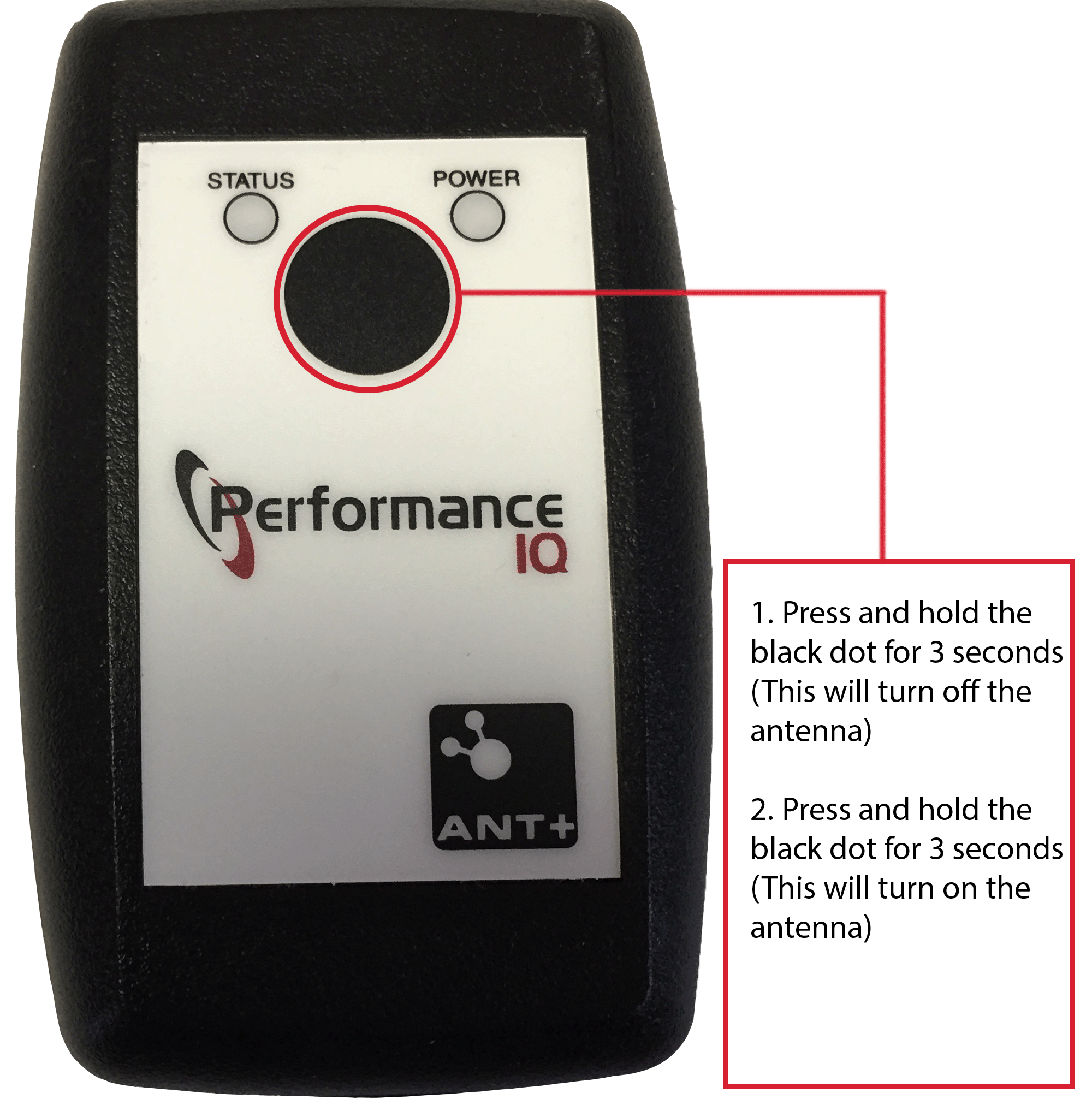
- The lights will flash for a few seconds, and the green light should blink twice per second if connected.
- If no antenna lights are on:
- Unplug the charging cable from the wall adapter and plug the antenna into one of the laptop's USB ports.
- If the lights do not come on, swap the cable out to see if a different cable will power the antenna.
- If the lights turn on but the antenna does not pair, follow the steps above for an antenna with lights.
- Unplug the USB cable from the wall adapter and plug it into one of the laptop's available USB ports.
- If no lights appear on the antenna, exchange the cable with the other antenna's cable to ensure the cable is not bad.
- If the antenna still does not power on and pair, submit a support ticket by following the link below.
4 out of 4 found this helpful